Define a Workflow
By default, Lucy projects come with a set of predefined statuses: To Do, In Progress, and Done. However, you can customize these statuses to better fit your project's workflow.
Adding Statuses to a Project
To define custom project statuses, use the following command in your terminal:
lucy new status DEMO REVIEW --order 3 --color yellow
This command will add a new status to the DEMO project with the status key REVIEW in the third position of the workflow.
The status key must be unique within the project and can only contain letters, numbers, underscores, and hyphens. Keys are stored in their uppercase variant, and treated as case-insensitive.
Status colors can be one of the following: red, green, blue, yellow, orange, purple, gray. Colors help visually distinguish statuses in the Lucy interface.
See the command reference for more options available when adding a new status.
Updating Statuses
To update an existing status, use the following command:
lucy update status DEMO REVIEW --name "In Review"
lucy update status DEMO REVIEW --description "Tasks that are in review"
See the command reference for more options available when updating a status.
Removing Statuses
To remove a status from your project, use the following command:
lucy delete status DEMO REVIEW
This action is irreversible and will delete the status. By default, tickets with the deleted status will be moved to the first status in the workflow. Use the --reassign-to option to specify a different status to reassign affected tickets.
See the command reference for more information on deleting statuses.
Visualizing Statuses
List
To list all statuses for a project, use the following command:
lucy list statuses DEMO
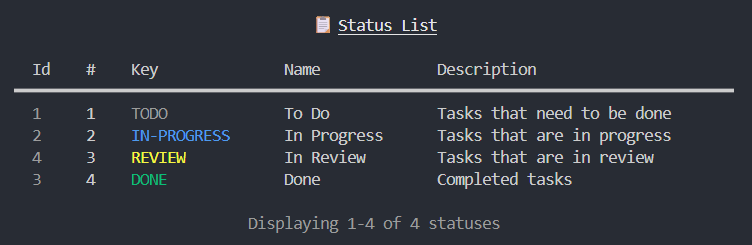
See the command reference for more options available when listing statuses.
Show Project
To view a summary of tickets by status, use the following command:
lucy show project DEMO
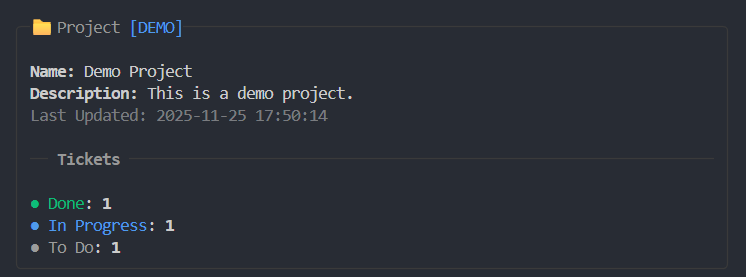
The ticket status summary will only display statuses after creating at least one ticket in the project.
Conclusion
Congratulations! You have successfully defined and customized project statuses in Lucy. For more information on managing project statuses, refer to the documentation.